
YouTube Monetization: 8 ways to monetize your YouTube channel
There are many ways to monetize YouTube videos like joining the YouTube Partner Program, creating online courses, sponsoring videos, or selling merch.
We all know that YouTubers can make serious money, and to do so, the most successful ones diversify their income streams, so let's look at how to monetize your youtube channel.
In this article, I prepared a list of 8 proven ways to monetize your YouTube channel, and divided them into 2 categories:
- YouTube-Native Monetization methods, which can be done directly from YouTube with their own features.
-
External Monetization methods, which require more effort, but can help you generate more significant amounts of money, even if you have a small audience.
1. YouTube Monetization with AdSense by joining the YouTube Partner Program
You can earn from ads on your videos by joining the YouTube Partner Program (YPP). YouTube reviews your channel before approving it for monetization.
Once you’re approved, you can enable eligible monetization features in YouTube Studio. Your finalized YouTube earnings are paid through AdSense for YouTube.
For Watch Page ads on public long-form videos and live streams, creators receive 55% of net ad revenue. Shorts use a different revenue-sharing model, explained below. See YouTube’s revenue share rates.
| Pros of monetizing through YouTube AdSense | Cons of monetizing through YouTube AdSense |
|---|---|
|
|
How much can YouTube creators earn for 1000 views?
There are 2 metrics that can help you understand this: CPM and RPM. CPM is the cost per 1000 ad impressions before YouTube revenue share, and RPM is your total revenue (after YouTube's revenue share) per 1000 views on YouTube. Some YouTube content niches have a higher CPM and RPM than others, which can improve your ability to monetize YouTube videos.
Which niches pay best?
A video's revenue depends on the number of views it gets, its target demographic, the age of your audience, how many ads play before or during it, as well as the video topic. Like on most social media platforms, each advertiser has to bid a certain amount of money in order to advertise, and the more profitable the profits in a specific niche, the higher the bid, and thus, the higher the payout for the content creator with ads on their videos.
Here are some examples of the more profitable topics if you want to earn money on YouTube:
- Business
- Investing
- Health
- Online marketing
- Tech reviews
- Coding
- Real estate
- Auto reviews
As you can see, these topics are not the most entertaining, but they target people with more money to spend to solve their problems, so if you plan to grow your YouTube channel, think of who you want to watch your videos.
AdSense monetization example
Graham Stephan is a great example of a channel that managed to make money on YouTube through AdSense, as well as other ways to monetize on YouTube efficiently by creating content in the finance and crypto space:
How to be eligible for monetization on YouTube
YouTube has separate thresholds for ad revenue and earlier access to fan funding. For ads and YouTube Premium revenue, new applicants need 1,000 subscribers plus one of these:
- Until January 31, 2027: 4,000 qualified public watch hours in the last 12 months, or 10 million qualified public Shorts views in the last 90 days.
- From February 1, 2027: 8,000 qualified watch hours in the last 365 days, or 20 million qualified Shorts views in the last 90 days. Existing YPP members keep their status.
See current YPP eligibility and YouTube’s 2027 announcement. Shorts Feed watch time doesn’t count toward the watch-hour route.
You also need to:
- Follow YouTube’s monetization policies and have no active Community Guidelines strikes.
- Live in a country where YPP is available.
- Turn on 2-Step Verification and have access to YouTube’s advanced features.
- Link an active AdSense for YouTube account, or create one in YouTube Studio when applying.
- Accept the relevant terms and pass YouTube’s channel review.
In countries with the expanded YPP, fan funding and selected Shopping features are available earlier: 500 subscribers, three public uploads in 90 days, and either 3,000 qualified watch hours in 12 months or 3 million qualified Shorts views in 90 days. Individual features have additional eligibility rules. This tier doesn’t unlock ad revenue.
Already monetizing? Accept updated modules in YouTube Studio by January 31, 2027 to keep associated earnings from February 1. Missing the deadline pauses those earnings until acceptance; it doesn’t remove your YPP status.
From February 1, 2027, activity requires either 1,000 qualified watch hours in 365 days, 1 million qualified Shorts views in 90 days, or two long-form uploads or five Shorts per 90 days. Falling below means a 90-day window to reach either viewing threshold. YouTube’s 2027 announcement explains these changes.
Check your progress and apply in YouTube Studio → Earn. The screenshot below shows an older interface; use the current thresholds above.
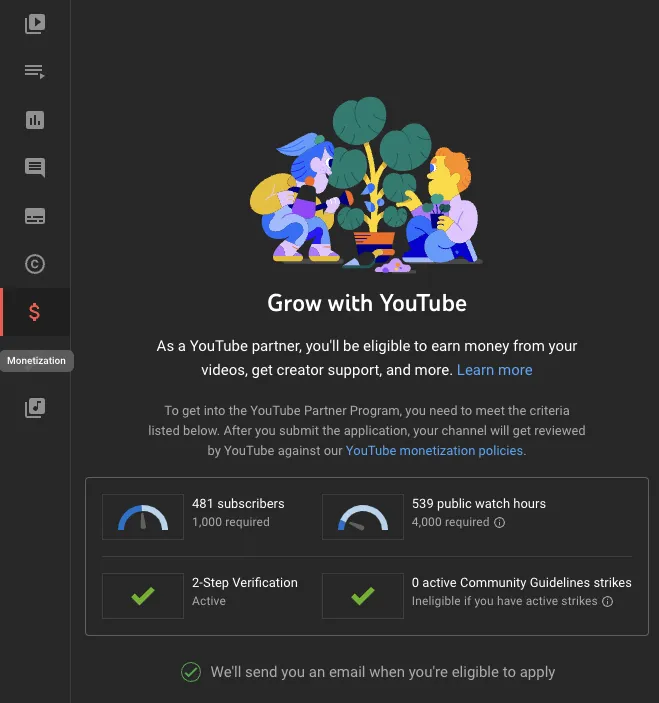
After YouTube approves your channel, accept the relevant monetization modules and turn on the features you’re eligible for.
2. Monetize your YouTube channel with Memberships
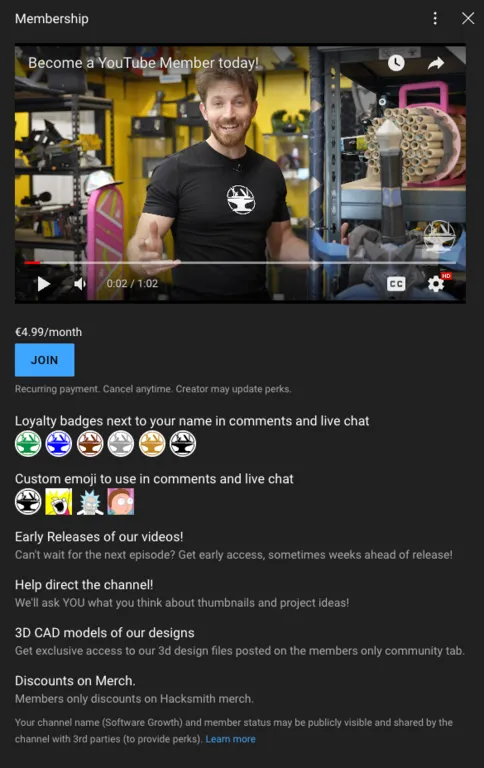
YouTube channel memberships are a great way for your viewers to support your channel and get access to exclusive content. For a monthly fee, your subscribers can become members of your YouTube channel and get access to exclusive videos, YouTube live streams, and other benefits. Channel memberships are a great way for your subscribers to show their support and get access to your best content.
You can also give access to custom emojis to use in comments and live chat, and exclusive YouTube community posts.
Creators receive 70% of net revenue from memberships under the Commerce Product Module. YouTube’s earnings overview explains the revenue share.
| Pros of YouTube Membership monetization | Cons of YouTube Membership monetization |
|---|---|
|
|
YouTube Membership monetization example
For example, the YouTube channel Hacksmith creates exclusive videos for members only:
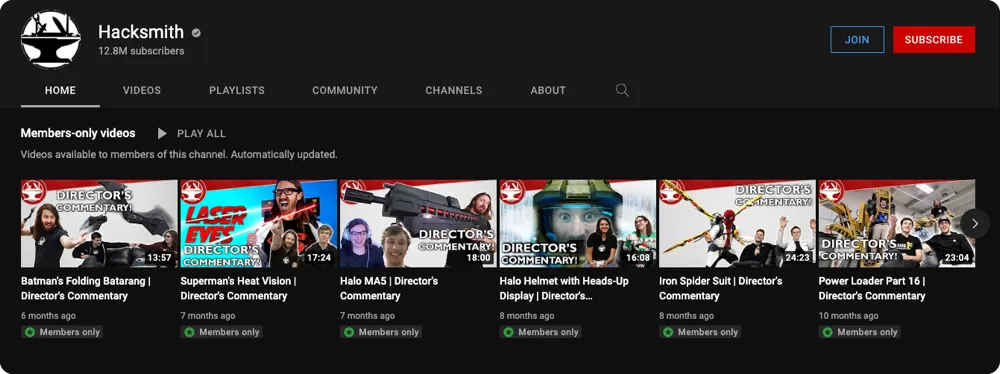
Here’s an example of their membership perks and pricing when this screenshot was taken. Current offers may differ:
How to activate YouTube Memberships
Here is a video from the YouTube team helping you activate this monetization feature:
3. Earn money on YouTube with Live Streams
YouTube Live is an easy way for YouTubers to reach their community in real time. Whether streaming an event, teaching a class, or hosting a workshop, YouTube has tools that will help you manage live streams and interact with your viewers in real time.
| Pros of YouTube Live Stream monetization | Cons of YouTube Live Stream monetization |
|---|---|
|
|
Manage YouTube Super Chat & Super Stickers for Live Chat
Super Chat and Super Stickers are ways to monetize your channel through the YouTube Partner Program. These features let your viewers purchase live chat messages that stand out and sometimes pin them to the top of a live chat feed. You can learn how you can turn on this feature here.
What you can stream
All content in live streams must adhere to the YouTube Community Guidelines and Terms of Service. If you stream content that violates the YouTube Community Guidelines, the platform may age-restrict or remove your live stream. YouTube also reserves the right to restrict a creator's ability to live stream at its discretion.
Example of a YouTube Streamer: Ludwig
Ludwig creates gaming content and receives super chats or Super Stickers from his viewers, which are similar to the Twitch donation system.
He also reposts edited versions of his livestreams, which are also monetized through Adsense.
How to get started
Here is a video from the YouTube Team about monetizing Lives videos with Super Chats and Super Stickers:
4. Showcase products from your store on YouTube
YouTube Shopping allows you to showcase your products and official branded merchandise on YouTube if they consider you as an eligible creator. After you set up YouTube Shopping, viewers in these locations will be able to browse and buy your products across these surfaces on YouTube:
- Your channel’s store
- Video descriptions and the Shopping button on your content
- Product section below your videos and live streams
- Tagged products in videos, Shorts, and live streams
In YouTube Studio, you can organize your products to display across these surfaces. With channel level and individual video arrangements, you can customize the order of your products to fit your needs.
You can learn more about YouTube shopping here.
| Pros of Youtube Shopping | Cons of Youtube Shopping |
|---|---|
|
|
5. Monetize your content with Shorts
The YouTube Shorts Fund has been discontinued. Eligible YPP creators now earn from ads between videos in the Shorts Feed after accepting the Shorts Monetization Module. Creators keep 45% of their allocated Creator Pool revenue, rather than 45% of every ad shown next to their Shorts.
To learn more about this new system, click here.
| Pros of YouTube Shorts monetization | Cons of YouTube Shorts monetization |
|---|---|
|
|
How to qualify for Shorts monetization
Meet the ad-revenue entry thresholds above and accept the Shorts Monetization Module. Revenue sharing starts from acceptance; earlier views aren’t paid retroactively. Only eligible engaged views count for earnings. Non-original content, fake views, and content that breaks advertiser-friendly guidelines can be excluded.
From February 1, 2027: monthly Shorts Creator Pool and Premium earnings require 10 million qualified Shorts views over 90 days, measured through the 15th of the preceding month. Missing this minimum doesn’t remove you from YPP or affect long-form earnings. Eligible targeted ads to groups of five or fewer channels can also pay a direct 45% share. Read YouTube’s Shorts monetization policies.
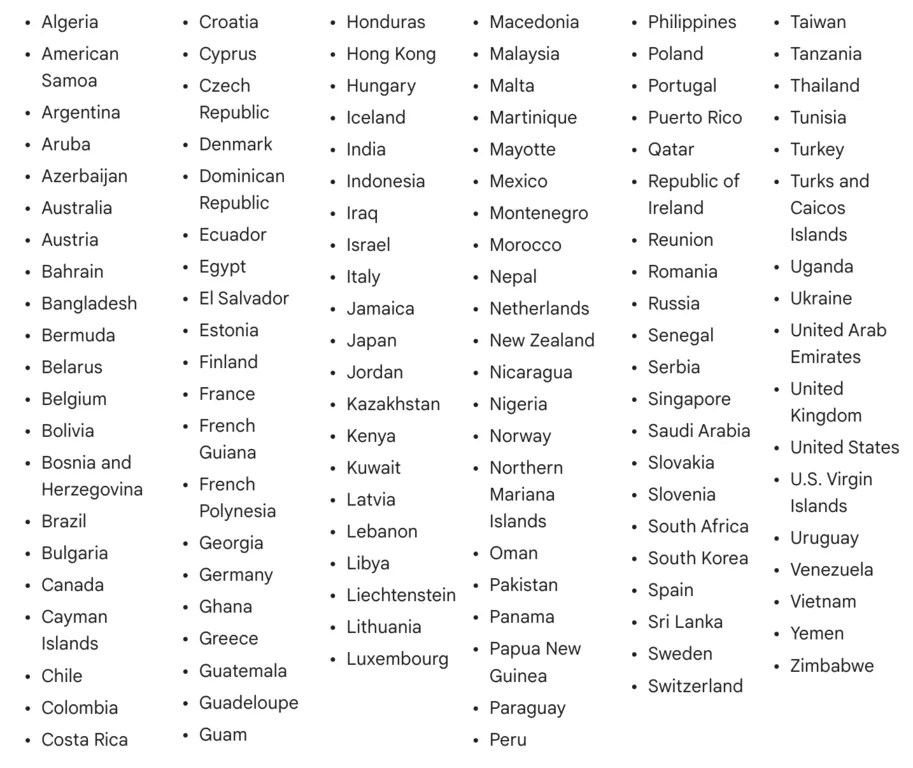
The image below records country availability for the discontinued Shorts Fund. It is historical, not a current eligibility list; check YPP country availability for today’s program.
Example - Marketing Mania
The founder of the website you're on, Stan Leloup, has a channel called Marketing Mania, on which he created dozens of shorts to try out this new format, and... His results were amazing!
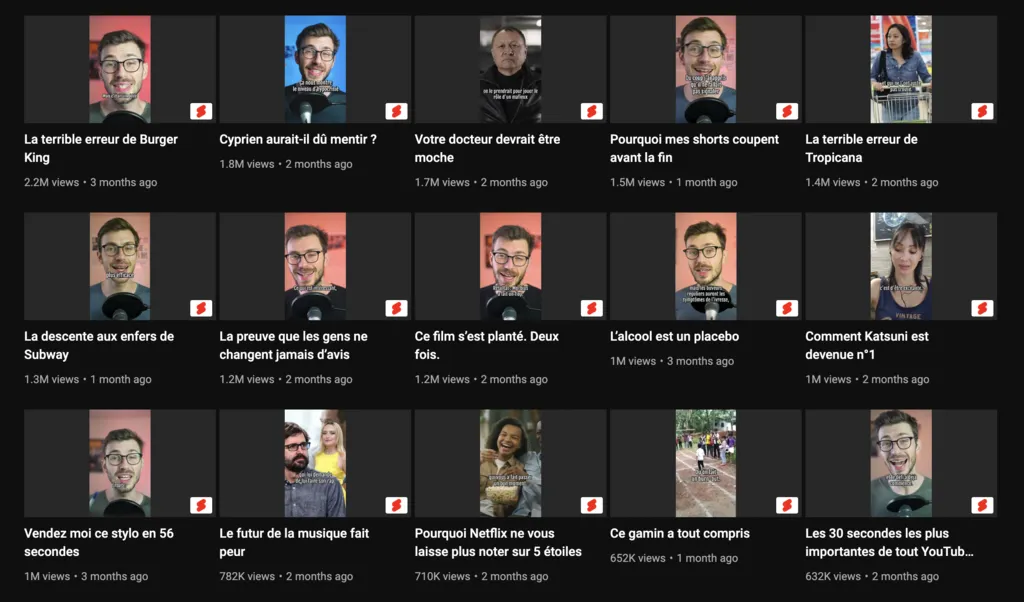
In this historical Shorts Fund example, Stan got millions of views, but the payment below was modest. It doesn’t show what those views would earn under today’s revenue-sharing model.

This is why he also monetizes by selling valuable online courses to his audience, which is an external way of generating money with YouTube videos.
6. Sell online courses to your YouTube community
Selling online courses to your subscribers is a great way to bring more value to your followers as well as build a new stream of income for your content creation business. Creating an online course can take you from a few hours to a few months depending on how much time you put into it, and you probably already have all the gear you need to get started!
This is what we did ourselves, I used to work with Stan Leloup on Marketing Mania, one of the biggest YouTube channels in the marketing and business space in France. And the main source of revenue of this channel is creating and selling premium online courses.
Stan started creating his first courses by taping up together many no-code solutions like Zapier and WordPress plugins, but this isn't an idea solution at all, especially when WordPress plugins are far from being the best solution for making courses.
This is why Stan decided to launch SchoolMaker, an advanced online course platform that makes it easy for YouTubers to build and scale an online course business.
If you need help with the creation of your course, we created an entirely free guide to help you go from idea to pre-launch of your course in a few weeks.
| Pros of online courses | Cons of online courses |
|---|---|
|
|
7. Monetize on YouTube with Affiliation
Affiliation is a commission-based marketing strategy where you earn a percentage of a sale or transaction. There are many YouTube affiliates who make money by uploading videos to YouTube and then linking to products they are affiliated with in the description section of their videos. This form of making money online can make individual videos even more valuable, as you can get a commission.
Amazon Associates is one example. Commission rates vary by product category and marketplace; there isn’t a universal 8% rate or an extra 5% on other purchases. Check the current US commission schedule and the rules for your local Amazon program before estimating earnings.
| Pros of YouTube Affiliation | Cons of YouTube Affiliation |
|---|---|
|
|
Example of a YouTuber who does affiliation
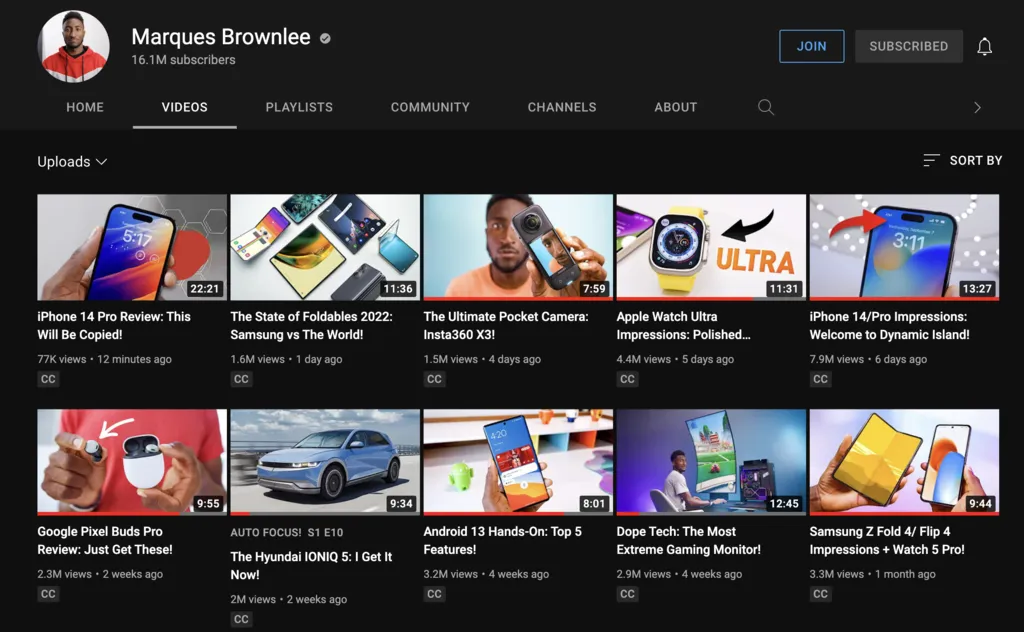
Marques Brownlee is a YouTuber who does tech reviews, and makes money by adding affiliate links to the descriptions of his videos.
How to get started with affiliation
The simplest way is to start by signing up to Amazon's affiliate program, which will allow you to create affiliate links that you can copy-paste into your video descriptions.
8. Make money through YouTube videos with sponsorships
YouTube video sponsorships are a form of advertising in which companies pay YouTubers to make videos that promote their products or services.
The company will usually provide all the content like images and videos for the advertisement and will get access to any analytics data that is generated by the video.
YouTube video sponsorships can be combined with affiliate marketing by promoting products online and earn commissions from sales they generate. They can be paid per click (CPC) or per sale (CPS) for example.
| Pros of video sponsorships | Cons of video sponsorships |
|---|---|
|
|
Examples - How Pewdiepie and Ryan George make money with Sponsorships
Pewdiepie is one of the most popular YouTubers of all time, with more than 100 million subscribers and billions of views. He has multiple income streams like YouTube Memberships, a few mobile games, live streams where he plays games and interacts with his fans, and of course, sponshorships.
He has a long-term sponsor deal with GFuel, which he promotes in almost every video he makes with ironic Ad sections like the one at the beginning of this video:
Another example of sponsored sections are Ryan George's, I like his a lot because the concept of the "Ad-stronaut" is pretty clever:
So what is the best way to monetize on YouTube?
At Marketing Mania, we tried all of these techniques, and the monetization technique that helped us the most grow our content creation business was online course creation.
With courses, Marketing mania now makes 7 figures every year, but as we grew, we ran into a lot of problems like that made it harder for us to run the business while providing a lot of value to our customers.
This is why we created SchoolMaker, the course creation tool that focuses on your student's results, so you can get better testimonials, and make more money!
If you're interested in the tool, you can check it out here.
And if you have an audience but don't have a course yet, you can check out our course creation guide by clicking on the book below.👇



Alexandru Golovatenco
I'm responsible for ensuring that every guide and article we publish helps you grow your online course business.